Getting locked out is a common problem, but for property managers, contractors, office operators, and access hardware buyers, it is more than a small inconvenience. A locked door without a key can stop deliveries, delay staff entry, interrupt guest service, and create unnecessary service costs. That is why the real question is not how to force a door open. The smarter question is how to regain access safely, legally, and with less disruption.
This is exactly where mobile-enabled smart locks have changed the conversation. Instead of relying on physical keys alone, many projects now use digital access methods that make lockouts easier to manage and much less expensive over time. For buildings that need flexible access control, a mobile lock can turn a lost-key problem into a simple permission update.
In many commercial and multi-user settings, a key is never just a key. When one key is lost, the problem can spread quickly. A hotel room, rental unit, office, internal door, staff entrance, or storage room may all depend on who still has access and who no longer should.
The hidden cost is usually not the key itself. It is the downtime, emergency callout fee, tenant frustration, staff waiting time, and possible rekeying work that follow. For distributors, developers, and project buyers, these repeated issues often become a purchasing pain point. They are not only buying a lock. They are buying a long-term access solution that must reduce service pressure after installation.
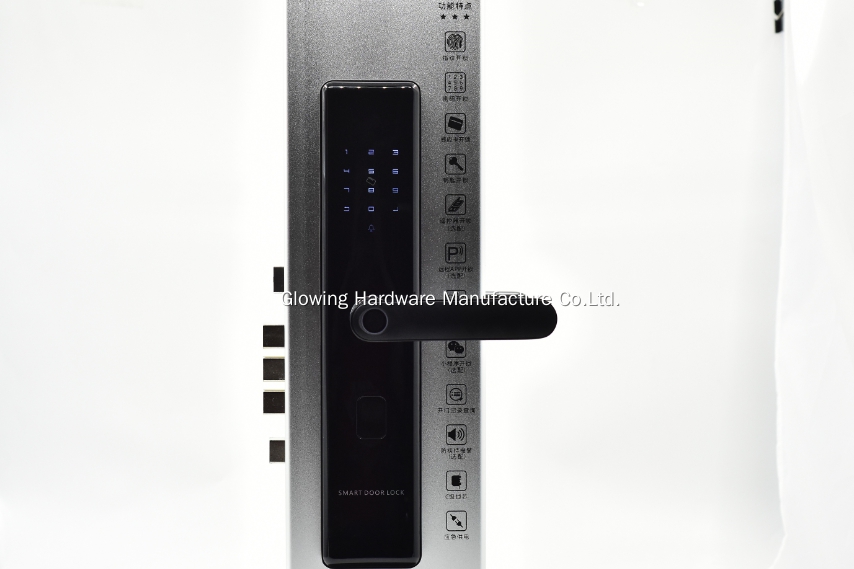
That is one reason more buyers are moving toward smart Door Lock Systems that support app control, fingerprint access, card credentials, and code entry. These options do not remove the need for security. They reduce the operational weakness of depending on one small object in one person’s pocket.
When a door is locked and no key is available, the right response depends on ownership, authorization, and the access system already installed. In real projects, the safest solutions are usually the ones that protect the door, preserve security records, and avoid damage.
If the site uses a mobile lock, authorized users may be able to unlock the door remotely through an app. This is especially useful for rental properties, managed offices, staff entrances, and residential units where the administrator is not physically present. A temporary visitor, cleaner, technician, or family member can be granted access without cutting a new key or waiting outside.
If the lock supports fingerprint, RFID card, or password entry, another approved credential may already be available. In many buildings, this backup method is what prevents a minor lockout from becoming an urgent maintenance issue.
If no approved digital method exists, the proper next step is to contact the property administrator, facility team, or a licensed locksmith. This keeps the process lawful and avoids damage to the door, frame, cylinder, or hardware set. Forced entry may look faster in the moment, but it often creates a more expensive repair problem and may also compromise site security.
A modern mobile lock is not only about convenience. It solves a real operational issue that traditional keyed hardware struggles with. When access rights can be managed digitally, the response to a lockout becomes much faster and much more controlled.
For example, if a cleaner arrives early, a manager can send access remotely. If an employee loses a key, the site does not always need to replace hardware immediately. If a tenant checks in late, the property team can issue a code instead of arranging physical key handover. If a contractor needs one-time entry, permission can be granted for a limited period rather than creating another uncontrolled spare key.
This shift matters to buyers because it changes after-sales workload. A lock that opens through mobile authorization, fingerprint recognition, RFID card, and password gives projects more than one recovery path when the key is missing. That flexibility is valuable in offices, apartments, light commercial buildings, and managed residential projects where access cannot depend on a single method.
Not every smart lock solves the same problem equally well. Buyers who want fewer service calls should pay attention to how the lock fits daily use, not only how it looks in a catalog.
The first point is access redundancy. A strong design should support multiple unlocking methods so users are not trapped by the loss of one credential. Mobile access, fingerprint, card, and password support create a more resilient system.
The second point is door compatibility. In project supply, buyers often need one hardware line that can work across different applications. A lock that suits wooden doors, metal doors, steel doors, interior doors, and outer doors is easier to standardize across mixed projects.
The third point is operating reliability. A lock used in residential and commercial settings should function in a realistic range of temperature and humidity conditions. That matters for entrances, corridors, offices, apartments, and properties in changing climates.
The fourth point is technical support. Buyers do not just need hardware shipped out. They need guidance on installation, setup, use training, and post-sale troubleshooting. Good support reduces hesitation during specification and speeds up adoption after delivery.
The demand for mobile smart locks is growing because the lockout problem exists in many industries. Property managers want easier tenant access control. Office operators want to reduce lost-key incidents. Apartment projects want a cleaner check-in process. Contractors want hardware that feels current and practical. Importers and distributors want products that answer real market pain rather than only offering a new appearance.
In these environments, the value of a smart lock is very direct. It saves time when access must be granted quickly. It lowers dependence on physical key handling. It helps reduce emergency access arrangements. It makes user management more flexible. It also supports a more modern positioning for buildings that want both security and convenience in one product category.
For buyers comparing options, a mobile lock with remote app capability and multiple unlocking methods is a practical answer to the title question. It does not encourage unsafe entry. Instead, it provides an authorized way to open a locked door when a key is unavailable.
This approach is much more suitable for real-world projects than relying on improvised lockout methods. It protects the hardware, keeps access controlled, and improves the user experience at the same time. That is why more buyers are treating smart locks as part of a broader access strategy rather than as a simple replacement for a mechanical lock.
A product in this category is especially relevant when the project needs a modern design, flexible user permissions, and support for different door types. It is also a strong fit for buyers who want fewer key-management problems after installation and a more efficient way to handle daily access events.
Opening a locked door without a key should never mean damaging the lock or bypassing security. In real projects, the better solution is to use authorized access methods that are safer, faster, and easier to manage. That is where mobile smart locks make a clear difference. They turn a lockout from a disruption into a manageable access task.
If you are reviewing smart lock options for residential, office, rental, or project use, we can help you evaluate the right model for your door type, access method, and order plan. Share your application needs with us, and we can provide product guidance, technical support, and a practical recommendation for your project.